Most of a university networking curriculum teaches concepts that live above the cable — addressing, routing, firewalls, DNS, client–server behaviour, troubleshooting — and those teach well in cloud labs, where each student or group gets a private multi-machine topology they can configure, break and capture traffic inside. What cloud labs do not replace is the physical layer itself: racking switches, handling cables and vendor-specific hardware still need real equipment or dedicated emulators. This guide maps which exercises move well, how isolation and packet capture work, and how to run topologies as reusable templates.
Can networking be taught in a cloud lab?
Yes — with a clear scope. Networking teaching splits into concepts (how addressing, routing, name resolution, firewalls and protocols behave) and hardware craft (physically building networks from switches, routers and cable). Cloud labs are strong for the first category because they give every student something a physical lab rarely can: their own complete network of several machines, isolated from everyone else's, with root access on every node and permission to break things.
The honest boundary is the second category. If the learning outcome is 'configure this vendor's switch hardware' or 'diagnose a physical-layer fault', a cloud lab teaches around it at best. Most degree-level networking modules contain far more of the first category than course teams initially assume — which is why the right question is exercise-by-exercise, not module-by-module.
Which networking exercises work well remotely?
The exercises that translate best are the ones defined by configuration and observation rather than by touch:
- IP addressing and subnetting — students design and apply addressing plans across a small multi-machine network
- Routing — Linux machines as routers between private subnets, static routes, and dynamic routing where the module goes that far
- Firewalls — host and network firewall rules, tested by probing between machines the student controls
- Client–server fundamentals — standing up and consuming services (web, SSH, file) across a network they built
- DNS and DHCP — running the infrastructure services, not just using them
- Packet capture and protocol analysis — capturing their own topology's traffic and reading it (see below)
- Network troubleshooting — lecturer-built 'broken' topologies students must diagnose, redeployable identically for everyone
- Network security exercises — scanning, segmentation and hardening inside a contained network, adjacent to the cyber security labs guide
Notice how many of these are awkward in a physical teaching lab — where students share infrastructure they must not break — and natural in a private topology that exists to be broken.
What does not translate from the physical lab?
Be explicit with course teams about the exclusions, because they shape which modules move. Physical-layer skills — cabling, racking, console leads, reading link lights, diagnosing a dodgy patch cable — need real hardware. Vendor-specific device craft (a syllabus aligned to a particular switch and router vendor's certification track) needs that vendor's equipment or its official emulation tools, which are a separate provision decision from a general cloud lab. Wireless and radio work is physical by nature. And very timing-sensitive experiments — precise latency and jitter measurement as the object of study — behave differently on virtualised networks and should be treated accordingly.
None of this argues against cloud delivery for the rest of the module; the workable pattern in many departments is a hybrid, with concept and configuration exercises in cloud topologies and a smaller physical rack provision for the hands-on-hardware sessions that genuinely need it.
| Comparison area | Physical equipment lab | Cloud lab topology |
|---|---|---|
| Per-student networks | Rarely — kit is shared and scheduled | Standard — one topology each, or per group |
| Breaking things safely | Constrained; shared kit must survive | Encouraged; reset from template in minutes |
| Physical-layer skills | Native | Not covered |
| Vendor device craft | Native on that vendor's kit | Only via separate emulator provision |
| Concept and configuration work | Possible but contended | Strong — isolated, repeatable, assessable |
| Remote and distance students | Excluded | First-class |
| Semester reset | Manual re-cabling and wiping | Redeploy the environment template |
How do topologies and reusable templates work?
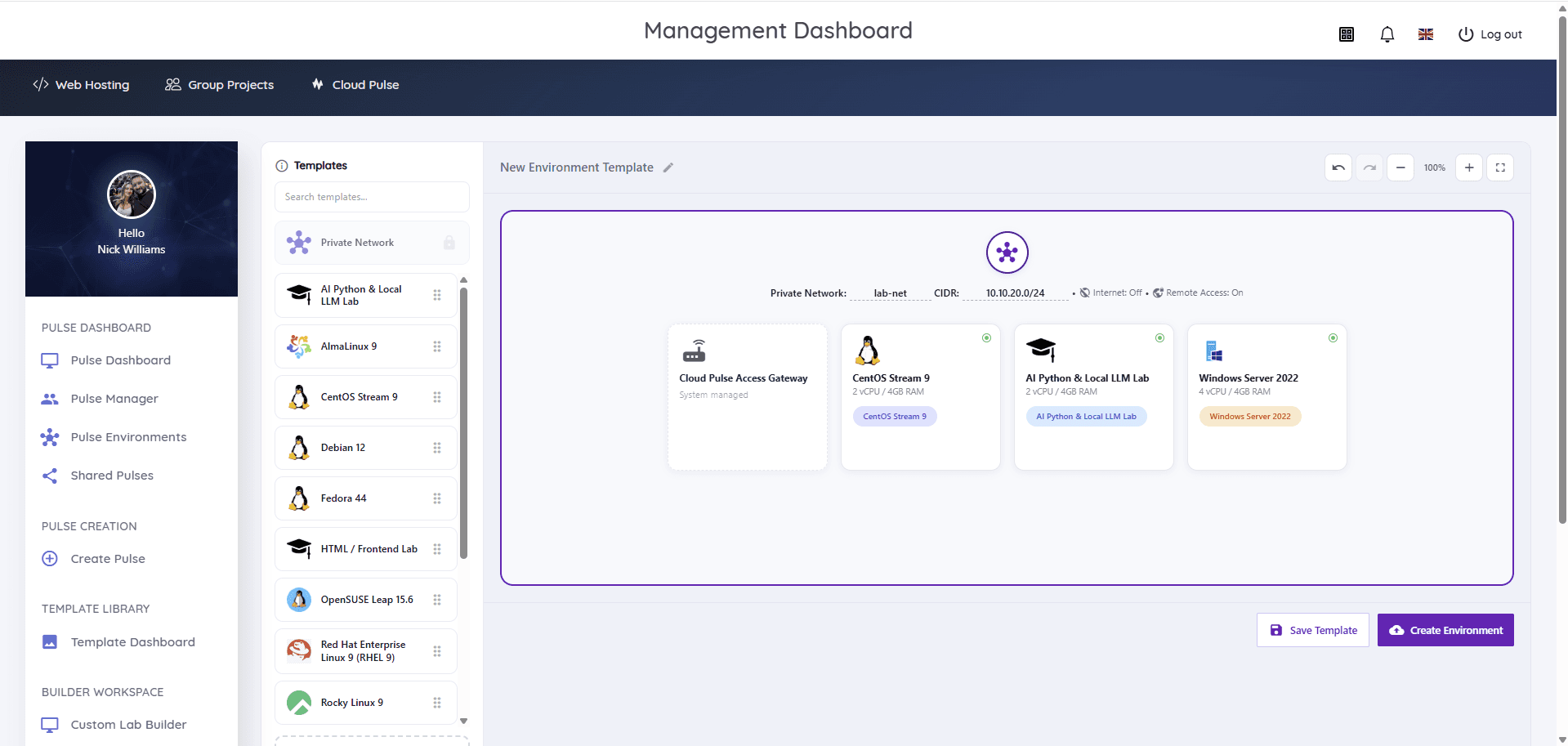
A teaching topology — say, two subnets joined by a Linux router, a server on one side and clients on the other — is designed once and captured as a multi-machine environment template: the machines, their networks and their starting configuration as a single deployable object. Each student or group then receives an identical private copy, and next year's cohort gets the same tested topology without rebuild.
This is the mechanism that makes networking teaching repeatable and markable: 'the week 7 routing lab' stops being an afternoon of setup and becomes a named, versioned artefact. The reusable templates guide covers the lifecycle discipline (building, cleaning, versioning, review); the networking-specific addition is to keep topology diagrams in the module materials matched to the template version students actually receive.
Read next: Reusable virtual machine templates guide
How are isolation, internet access and public IP addresses handled?
Networking exercises generate exactly the traffic — scanning, probing, misconfigured services, deliberate storms — that must never touch a shared network, so isolation is not a nicety here but the enabling condition. Each topology runs as a private network with no route to other students' labs or institutional systems; students reach their machines through a managed gateway rather than direct exposure; and the blast radius of any mistake is the student's own topology.
Internet access defaults to off and is enabled per lab only where an exercise needs it — pulling packages during setup is usually better solved by baking them into the template. Public IP addresses should be rarer still: almost no networking exercise requires genuine inbound internet exposure, and a 'we'll just give the server a public IP' convenience creates a real attack surface plus a real cost. Treat any public-facing requirement as a scoped exception with an owner and an end date, per the security and governance guide.
Read next: Cloud lab security and governance
Can students use packet capture?
Yes, and it is one of the quiet advantages of the private-topology model. Students run capture tools on machines they control, inside a network where every packet belongs to their own exercise — so the ethical and privacy problems of capturing on shared infrastructure simply do not arise, and the traffic they see is legible because they generated it. Capturing the three-way handshake of a connection you just made to a server you just built is the version of protocol analysis that actually lands.
Root access inside the environment makes the tooling unremarkable: capture utilities, traffic generators and analysis tools install like any other software, or arrive pre-installed in the module template. The privileged-access principle from elsewhere in this series applies unchanged — full control inside the environment, none outside it.
How should resets, sizing and cost work for networking labs?
Resets are per-machine or per-topology: a student who has wrecked one router restores that machine to its template state; a topology beyond salvage is redeployed whole. Encourage the habit of exporting configurations before resets — it is both good practice and the professional workflow.
Sizing is where networking labs differ from most subjects: the machines are individually small (a router or DNS server needs little memory), but the count multiplies — five machines per student across a cohort of eighty is four hundred environments. That makes lifecycle discipline the cost lever: topologies deployed for the exercise window rather than the whole term, stopped when idle, and torn down at module end. The cost-control guide covers the operational side in depth.
Read next: How to control student cloud-computing costs
How should networking assessment be handled?
The template model makes practical networking assessment unusually fair: every candidate receives an identical topology, deployed fresh from a frozen version, so 'configure routing between these subnets' or 'diagnose why this client cannot reach this server' is the same task for everyone. Diagnostic assessments — lecturer-built broken topologies — are particularly strong, because they are laborious to stage physically and trivial to redeploy virtually.
Evidence can be richer than screenshots: exported configurations, capture files showing the required behaviour, and written diagnosis submitted through normal channels. Freeze the assessment template version through the window, keep environments available through marking, and archive the exact template used, as the templates guide describes for assessment generally.
How does Cloud Pulse support networking teaching?
Multi-machine networking topologies are what Cloud Pulse's Custom Lab Builder exists for: lecturers compose machines and private lab networks on a visual canvas — internet access off by default, remote access through a system-managed gateway — and save the design as a reusable environment template deployed per student or group. Pulse Manager shows every environment live during sessions, with browser console and Web SSH access for helping a student inside their own topology, and broken machines reset from their template.
The physical-layer boundary is honest here too: Cloud Pulse delivers network concept and configuration teaching, not switch-rack craft. Departments running both typically keep a small hardware provision alongside — and there is a networking labs use case page showing how the platform side maps to real module shapes.