A reusable virtual machine template captures a module's complete working environment — operating system, tools, configuration and sample content — as a single definition from which identical copies are deployed for every student, every semester. Templates are what turn practical teaching environments from a rebuilt-each-term chore into a maintained asset: the environment is built and tested once, cleaned of credentials and personal data, versioned, and redeployed on demand. This guide covers who should build them, what goes in and stays out, how to clean, test, version and review them, and how they underpin fair assessment.
What is a reusable virtual machine template?
A reusable virtual machine template is a captured machine image — or a definition spanning several machines — used as the source for creating identical environments on demand. Rather than installing a module's software on each machine or asking students to build their own environments, the environment is prepared once and every deployment is a fresh copy of that known-good state.
A distinction worth keeping sharp: a base operating-system image is a clean install of, say, Ubuntu or Windows Server, useful as a starting point; a module-ready template is that base plus everything the module needs — tools at pinned versions, configuration, sample data, documentation — tested against the module's actual exercises. Platforms supply base images; module-ready templates are where teaching value is created, and they are what this guide is about.
Why do templates matter in teaching?
Because consistency is pedagogy in practical computing. An exercise on permissions, services or pipelines only works when every student starts from the state the instructions assume — and templates make that state a guarantee rather than a hope. The same property makes assessment fairer: every candidate faces the same environment.
The economics compound over time. The genuinely hard work — a correct, working module environment — is paid for once instead of every semester; module handover between staff becomes 'here is the template and its notes' rather than an afternoon of tribal knowledge; and reset workflows become trivial, because a broken machine is simply redeployed from source. Teaching teams that adopt templates rarely go back.
Who should build teaching templates?
Jointly: the module leader owns what the environment contains, because the environment is the module's teaching material; the technical team owns hygiene and standards — cleaning, capture, naming, storage and review discipline. Templates built by lecturers alone tend to leak credentials and rot unversioned; templates built by IT alone tend to miss what the third practical actually needs.
Platforms differ in how much of this lecturers can do themselves versus what routes through technical staff, and that difference matters operationally — a template workflow lecturers cannot touch becomes another ticket queue. Whoever builds, the ownership rule stands: every template has a named owner and a review date, or it is abandonware waiting to happen.
What should go into a template — and what must stay out?
The test for inclusion is simple: does every student need it, identically, from minute one of the module?
- In: operating-system updates current at build time, the module's tools at pinned versions, required services pre-configured, sample data and exercise files, a student-facing readme, and any accessibility tooling students rely on
- In: sensible defaults that save the first session — editors configured, services enabled, shortcuts where they genuinely help
- Out: real credentials of any kind — personal accounts, API keys, institutional passwords, tokens left over from the build
- Out: personal data — the builder's files, browser history, cached logins, email configuration
- Out: licence keys that must not propagate to every copy, and licensed software the institution has not cleared for lab-wide deployment
- Out: student accounts — identity belongs at deployment time through the platform and institutional sign-in, not baked into the image
- Out: anything machine-specific — fixed hostnames, static addresses, machine identities that will collide when the template becomes fifty machines
How should templates be cleaned before capture?
Cleaning is the step that separates a professional template from a copied hard drive, and it has two purposes: removing what should never be distributed, and generalising what must be unique per machine. On the first: remove or rotate every credential used during the build, clear shell and browser histories, logs, temporary files and caches, and check for personal data deliberately rather than assuming its absence. Never embed shared passwords or production credentials in an image as a convenience — anything secret that fifty students receive identical copies of is no longer a secret, and per-deployment credentials through the platform are always the better mechanism.
On the second: machines cloned from one image must not share identities. Windows images are typically generalised before capture — Windows' built-in generalisation process (sysprep) strips machine-specific identity so each deployed copy comes up as its own machine; your platform's documentation covers the specifics. Linux images get the equivalent treatment: machine IDs cleared, SSH host keys removed so each copy regenerates its own, network configuration returned to defaults and histories emptied — the conventions cloud-init-style tooling exists to support.
Two cautions belong in every template process. A captured image is not automatically secure — it is exactly as secure as what you put in and took out of it. And it is not automatically current: it ages from the moment of capture, which is why review dates and update cycles are part of the discipline rather than an optional extra.
A template creation lifecycle
Treat template creation as a repeatable process rather than a heroic one-off. The lifecycle below fits any platform; only the mechanics differ.
- Define — what the module needs: operating system, tools and versions, services, data, and any multi-machine layout
- Build — from a clean base image, installing and configuring deliberately, noting what and why as you go
- Test as a teacher and as a student — run the actual practicals, then repeat with student-level permissions
- Clean — credentials, personal data, histories, machine identity: the pre-capture checklist below
- Capture and version — name it properly, record owner, date and changelog
- Deploy-test — create a fresh environment from the captured template (not the build machine) and verify it end to end
- Release — make it available for the cohort deployment
- Review — set the date it will be revisited, normally before the module's next delivery
The pre-capture checklist
Run this immediately before capture, every time — including recaptures of updated templates, which is when steps get skipped.
- Operating-system updates applied and the module's tool versions pinned and recorded
- Every practical exercise run end to end inside this build
- All build-time credentials removed or rotated; no personal accounts, keys, tokens or saved logins remain
- No personal data: files, browser profiles, histories, caches and logs cleared
- Machine identity generalised (Windows) or cleared with host keys removed (Linux)
- No student accounts baked in — identity arrives at deployment
- Licence position checked for anything licensed in the image
- Accessibility tooling present and working
- Student-facing readme current, including where to keep durable work
- Name, version, owner, changelog entry and review date recorded
How should templates be versioned, owned and reviewed?
Name templates so their identity is obvious at a glance — module code, academic year and a version number tells anyone what COMP2041-2026-v3 is for and which of its siblings is newest. Keep a one-line changelog per version; future-you rebuilding a broken lab at short notice will need it.
Ownership and review are what stop template libraries rotting. Every template carries a named owner (usually the module leader) and a review date — normally before the next delivery of the module — at which its contents, versions and security position are revisited rather than assumed. Keep the previous version available until the new one has survived a deploy-test and ideally a real session: rollback is a version pointer, not an archaeology project.
How should templates be tested?
The cardinal rule: test the captured template, not the machine you built it on — capture and generalisation can change behaviour, and the build machine is contaminated by everything you did to it along the way.
- Deploy a fresh environment from the captured template and run the first practical in it completely
- Repeat with student-level permissions — builder-privilege blindness is the classic template bug
- Check every access method the module uses: browser session, SSH, remote desktop as applicable
- Verify the reset workflow: break the environment, redeploy, confirm the student would be back in minutes
- Test on the weakest realistic student setup — small screen, ordinary broadband — not just a staff workstation
- Have someone other than the author follow the readme cold: if they stall, students will
- Rehearse a mid-module update once per template: change something small, recapture, redeploy, confirm nothing else moved
How do templates support consistent assessment?
Assessment is where template discipline pays its clearest dividend: every candidate starts from a byte-identical environment, which removes the my-machine-was-broken class of dispute entirely. Freeze the template version at the start of the assessment window — mid-assessment updates are how identical stops being true — and deploy fresh environments for the assessment rather than reusing teaching ones full of accumulated student state.
Integrity cuts the other way too: check the assessment template for accidental answer keys — completed exercises, command histories from the build, marker notes — before capture. And archive the exact version used for each assessment window, because appeals and academic-integrity processes can ask precise questions about the environment months later; a named, stored template version is a complete answer.
How do students get fresh or repaired environments?
Deployment from template makes provisioning and repair the same operation: each student receives a fresh copy at module start, and a broken environment is reset or redeployed rather than debugged — minutes of self-service instead of a support ticket, which changes how bravely students experiment. That workflow is a teaching feature, not just an operational one.
Its corollary belongs in week one's teaching: durable work lives outside the machine. Scripts, configurations and notes go to version control or institutional storage as a habit, so a reset costs nothing but the reset. Modules that teach this early spend the rest of the term collecting the dividend.
Example templates by subject
What module-ready means varies usefully by discipline — these examples are shapes to adapt, not prescriptions.
- Windows administration — Windows Server with the module's roles staged for configuration practice, exercise docs on the desktop
- Linux administration — the chosen distribution with services deliberately left for students to install, configure and break
- Databases — a database server with sample schemas and datasets loaded, client tools configured
- Networking — a multi-machine environment template: several connected machines on a private network forming the topology students explore
- Cyber security — an attack machine plus deliberately vulnerable targets, captured together as one environment (see the cyber security labs guide for the isolation this assumes)
- WordPress — a web stack with WordPress installed per student, ready for theme, plugin and content work
- Python — a pinned Python stack with notebook tooling, module libraries and datasets in place
- AI development — the Python stack plus a local language model and retrieval tooling, so the heavy downloads happened at build time, not in the first seminar (see the AI environments guide)
Read next: Cyber security labs guideAI development environments guide
How does Cloud Pulse handle teaching templates?
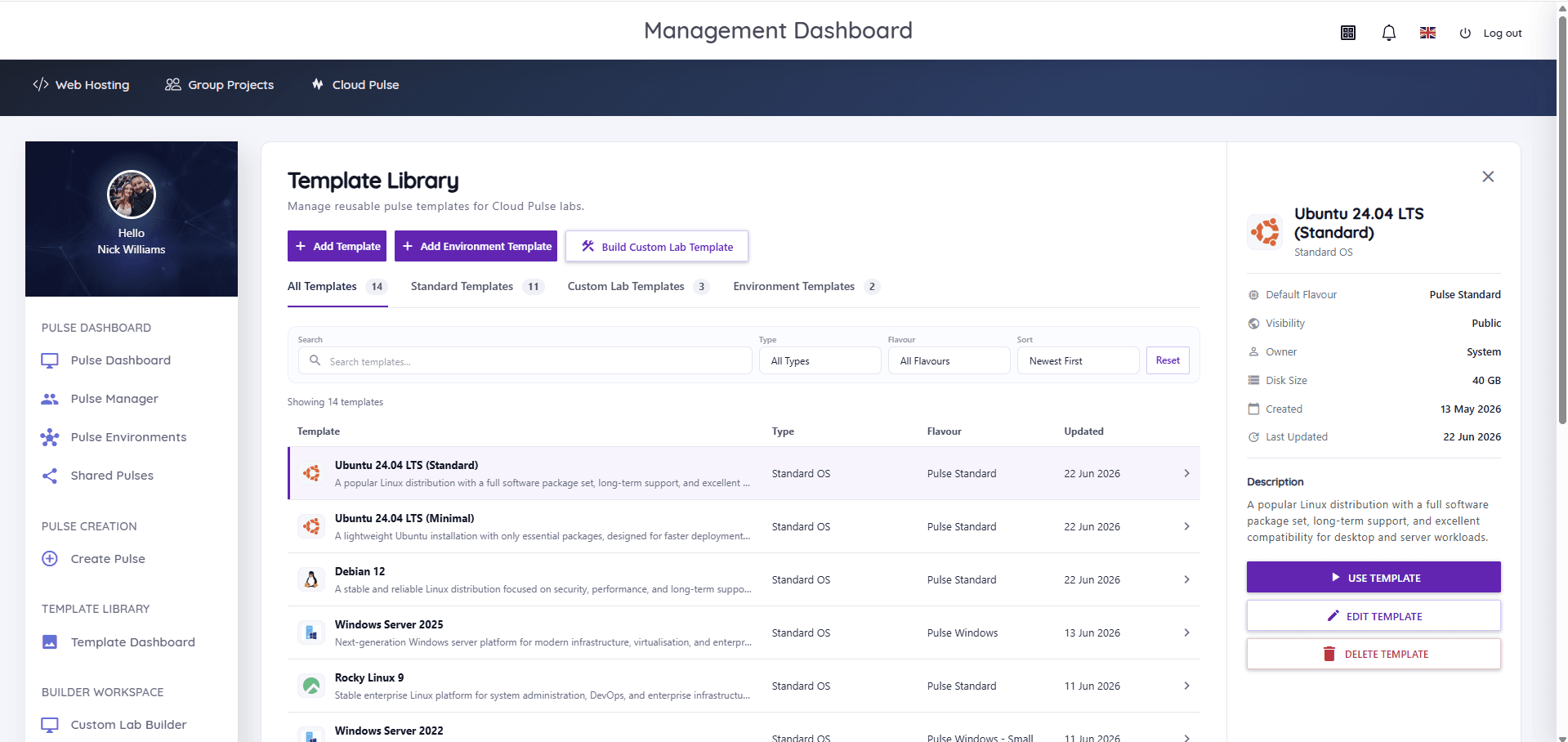
Templates are the organising idea of Cloud Pulse rather than a feature bolted on. The Template Library holds standard operating-system templates (Ubuntu, Debian, Windows Server, Rocky Linux and more), lecturer-built custom lab templates shaped around specific modules, and environment templates capturing whole multi-machine networks — searchable, filterable and reusable across cohorts and academic years. Lecturers create and deploy student-ready environments from them directly, and updating a template once means every future deployment uses the new build, which is the version-and-release discipline of this guide expressed as a platform workflow.
The lifecycle above still applies — cleaning, testing and review are yours whatever the platform — but the mechanics of capture, versioned reuse and cohort deployment are handled for you. If your current template process is a folder of setup notes and a heroic technician, the Cloud Pulse platform page shows what the maintained-asset version looks like.