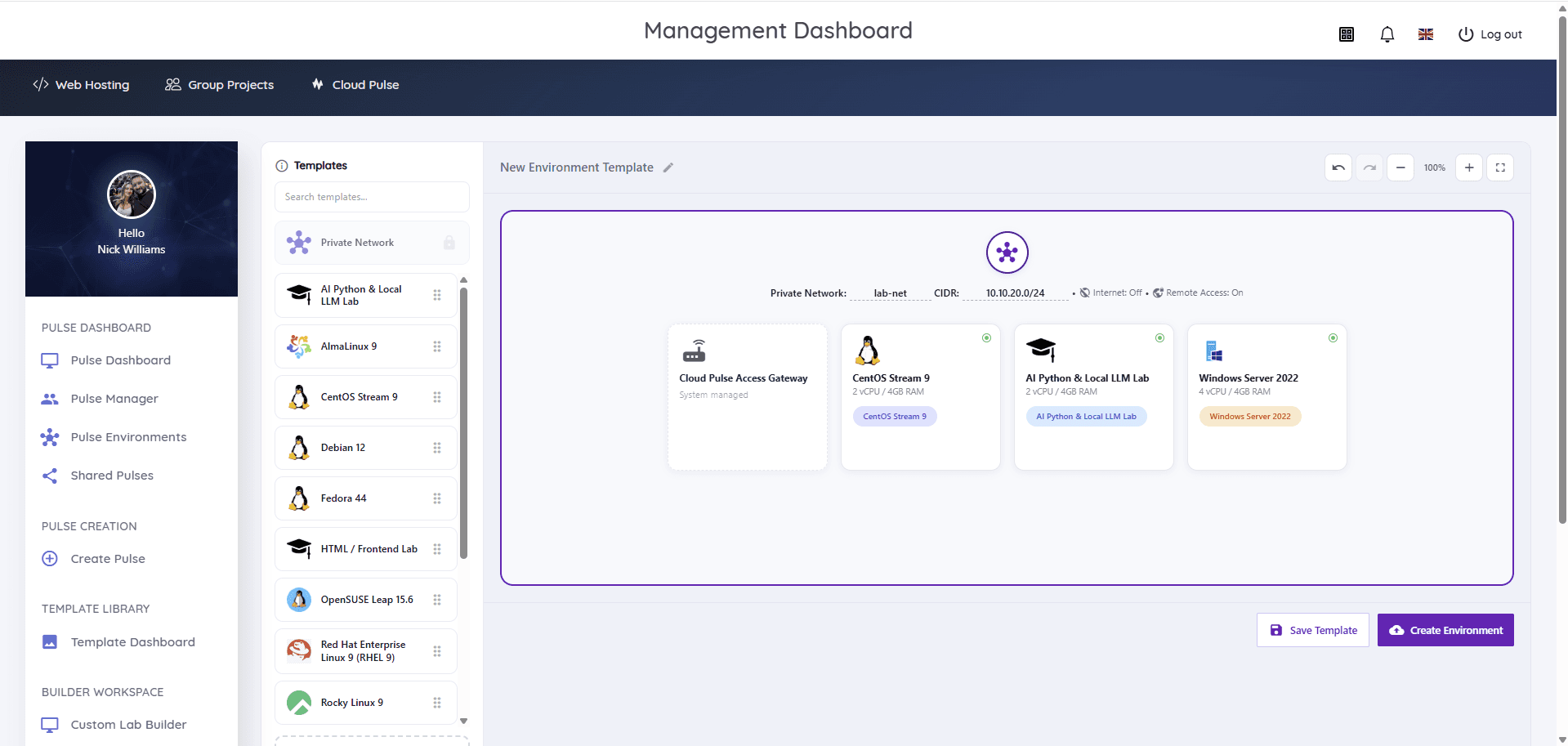
Universities provide cyber security labs by giving each student or group an isolated, disposable environment — typically a small private network of virtual machines containing attack tooling and deliberately vulnerable targets — kept separate from the institutional network, with internet access off unless a module needs it. The environments are built from reusable images, reset between exercises, and run within explicit acceptable-use boundaries, because the same activities outside an authorised lab would be both dangerous and unlawful.
Why are ordinary computer labs unsuitable for security teaching?
Shared campus PCs are managed to be safe, standardised and locked down — which is precisely what makes them wrong for security teaching. Students on a security module need administrative control of machines, permission to break them, and targets that are deliberately vulnerable. None of that belongs on a device other students use next hour, or on a network that carries institutional traffic.
The mismatch shows up in practice as security tooling blocked by endpoint protection, exercises that cannot run because students lack privileges, and — worse — scanning or exploitation traffic on networks where it could touch real systems. IT teams end up either refusing reasonable teaching requests or carving out risky exceptions.
A security teaching lab resolves the conflict by moving the dangerous work somewhere designed for it: environments where students have full control inside a boundary the institution controls absolutely.
What does a cyber security teaching lab need?
A workable security lab is defined by six properties. Missing any one of them tends to surface as either an operational incident or a module that quietly stops doing practical work.
- Isolation — lab networks separated from the institutional network and from each other, so exercises cannot reach anything they should not
- Disposability — machines that are expected to be compromised and can be destroyed and recreated without ceremony
- Realistic topologies — more than one machine per exercise: an attacker's machine, targets, and the network between them
- Both operating system families — Linux attack tooling and targets, and Windows machines, because real estates are mixed
- Lecturer control and visibility — staff able to deploy, observe and reset environments during a live session
- Explicit boundaries — acceptable-use rules, scoped exercises and records of who had which environment when
How is isolation achieved in practice?
Isolation comes from private lab networks: each exercise or group runs inside its own network segment that has no route to the institutional network or to other students' labs. Traffic generated in the lab — scanning, exploitation, malware behaviour in analysis exercises — stays inside the lab by design.
Internet access is the deliberate decision, not the default. Most security exercises need no internet at all, and keeping lab networks offline by default removes a whole class of risk. Where a module genuinely needs outbound access — pulling packages, an open-source intelligence exercise — it is enabled knowingly for that lab rather than inherited by everything.
Student access then flows through a managed gateway rather than exposing lab machines directly: students reach their environment through a controlled entry point (often a browser session), while the machines themselves remain unreachable from outside. No isolation model removes risk entirely, but this combination — private networks, deliberate internet policy, gateway access — is what keeps the realistic exercises inside defensible boundaries.
What machines and targets do security modules use?
A typical exercise pairs an attack machine with one or more targets. Kali Linux is the standard attack platform in most curricula, preloaded with the tooling students are examined on; targets range from stock Linux and Windows Server installs that students must assess, to machines deliberately configured with vulnerable services, weak credentials or misconfigurations that the exercise is built around.
Windows targets matter more than course materials sometimes suggest. Directory services, Windows authentication and Windows-specific attack paths are where much real-world security work happens, so a lab that can only field Linux machines narrows what can be taught. The same applies in reverse to defensive exercises, where students need realistic mixed estates to monitor.
Because targets are defined as images, a module's whole scenario — attacker, targets, network layout — can be captured once and redeployed identically for every student, every group and every subsequent cohort.
Why do security labs need temporary, resettable environments?
Security exercises break machines on purpose — a compromised target or a trashed attack box is evidence of the exercise working, not a fault to repair. The lab model has to treat machines as disposable: reset a single machine to its image, or tear down and redeploy the whole environment, in minutes rather than through a support queue.
Resettability also protects academic integrity between cohorts and between exercises. Every student starts from the same known state; artefacts left by one group cannot leak hints or attack paths to the next; and a machine left in an unknown state after an exercise is destroyed rather than trusted.
Temporary environments carry a governance benefit too: environments that exist only for the weeks a module runs, tied to enrolment, are far easier to account for than long-lived machines that accumulate unknown state and forgotten access.
What control do lecturers need during security teaching?
Live security exercises fail without lecturer visibility, because students get stuck inside environments staff cannot see. The teaching workflow needs staff to deploy environments per student or group, watch their status during a session, and reach any student's machine — ideally through a browser console — to unblock them without standing behind their laptop.
Control also means ending things: stopping an exercise, resetting a group's environment mid-session, and removing everything cleanly when the module finishes. In group attack-and-defend formats, staff effectively act as referees, and the platform's visibility is what makes refereeing possible.
What are the common security teaching scenarios?
Most university security teaching is built from a small set of repeatable scenario shapes, all of which assume isolation and disposability.
- Reconnaissance and enumeration — scanning and mapping a closed lab network without touching anything real
- Vulnerability assessment — identifying and reporting weaknesses in prepared targets
- Web application security — attacking deliberately vulnerable applications hosted inside the lab
- Privilege escalation — misconfigured Linux and Windows machines students must work up through
- Defensive monitoring — log analysis and detection exercises across a small mixed estate
- Incident response — investigating a pre-staged compromise and reconstructing what happened
- Attack-and-defend group exercises — teams alternately hardening and attacking mirrored environments
- Assessment scenarios — capture-the-flag style exercises deployed identically for every candidate
Each shape is an environment template: built once, deployed per student or team, reset between runs. That is why reusable images are not a convenience for security teaching but the mechanism that makes it repeatable.
Read next: Reusable virtual machine templates guide
What ethical and operational safeguards matter?
Security teaching hands students genuinely dangerous skills, and the lab is where the boundary between authorised practice and unlawful behaviour is made concrete. In the UK, unauthorised access to computer systems is a criminal offence under the Computer Misuse Act 1990 — part of what a well-run lab teaches is that authorisation is what separates a professional from an offender.
- Explicit acceptable-use terms for lab environments, agreed between the institution, provider and students
- Exercises scoped to the lab — never against real-world systems, campus infrastructure or other students' work outside the exercise
- Isolation as the enforcement backstop, so a boundary violation is contained rather than merely forbidden
- Named ownership — a module leader accountable for what each lab contains and how it is used
- Lifecycle records — which environments existed, for whom, over what period, and when they were destroyed
Providers have obligations here too. A platform used for security teaching should expect to agree acceptable-use boundaries with the institution rather than leaving them implicit — treat a vendor's unwillingness to discuss this as a warning sign. The wider estate-level controls — logging, supplier due diligence, incident response — are covered in the security and governance guide.
Read next: Cloud lab security and governance
How does Cloud Pulse support cyber security labs?
Cloud Pulse, Education Host's browser-based computing lab platform, was built with security teaching as a first-class case. Lecturers design multi-machine lab environments on a visual canvas — private lab networks with internet access off by default, reached through a system-managed gateway — combining Kali Linux images with Linux and Windows Server targets for attack-and-defend style exercises. Environments are saved as reusable templates, deployed per student or group, monitored live, and reset or removed from the same dashboard, with browser console access when a student is stuck.
Security labs on Cloud Pulse operate within acceptable-use boundaries agreed with each institution. It is one way to run security teaching rather than the only one — the requirements in this guide apply equally if you build isolation yourself in a public or private cloud — but if you want the isolation model operated for you, the Cloud Pulse platform page shows how it works.