A university cloud lab is secured in layers: institutional identity controls who gets in, role-based access controls what each person can do, network isolation keeps environments away from anything they should not reach, environment lifecycle limits how long risk exists, and logging plus clear governance make the whole estate accountable. No layer — and no supplier — makes a lab completely secure; the aim is an estate where student experimentation is contained by design, incidents are visible and recoverable, and responsibilities are written down before the first cohort signs in.
What security controls should a university cloud lab have?
Think in layers, because lab risk is layered: a control that stops one class of problem does nothing for the next. A defensible lab estate has an answer at each of these levels, and a named owner for each answer.
- Identity — sign-in through institutional accounts, so access follows enrolment and your existing identity controls (including MFA) apply
- Authorisation — role-based access separating what students, lecturers and administrators can each do
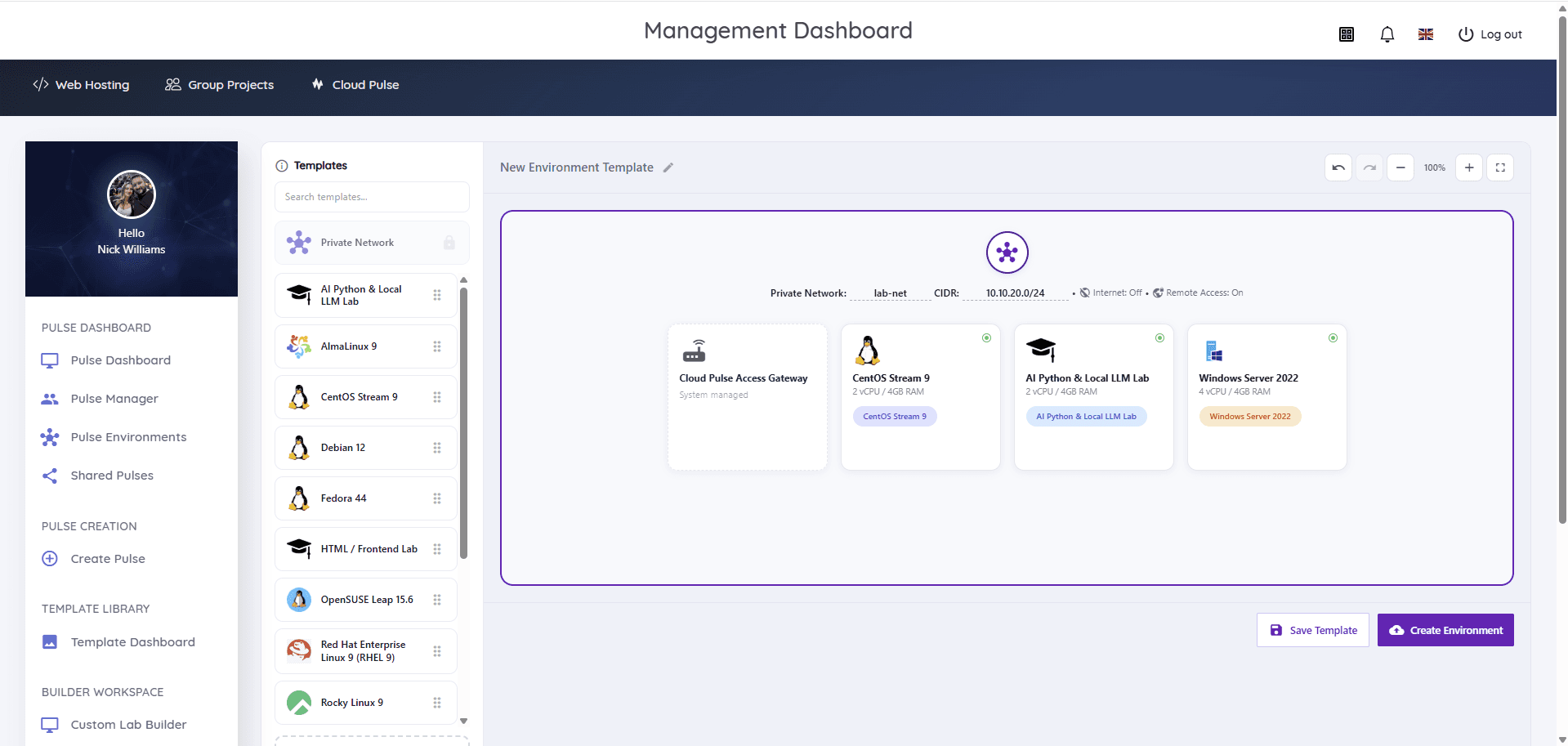
- Isolation — private networks per lab, separation from institutional systems, internet access as a deliberate per-lab decision
- Environment lifecycle — environments that exist only while teaching needs them, reset from known-good templates
- Template governance — an approval and review path for the images environments are built from
- Logging and audit — a record of who had what, when, and what administrative actions were taken
- Data rules — clarity about what students may put into lab environments and what happens to it afterwards
- Incident response — a plan for misuse, compromise and abuse that names people, not just intentions
The rest of this guide takes these layers in turn. The one-sentence governance test: for each layer, can you say who owns it — your institution, your supplier, or a lecturer — without checking?
How should identity and role-based access be managed?
Lab access should hang off institutional identity, not parallel accounts. When students and staff sign in with university credentials — for most UK institutions through Microsoft Entra ID — enrolment drives access, leavers lose access when their account closes, and institutional controls such as multi-factor authentication and conditional access apply to the lab like any other service. Separate lab passwords recreate exactly the unmanaged-credential sprawl institutional security policies exist to remove.
Authorisation then separates the three populations. Students get access to their own environments and nothing structural; lecturers get teaching controls — deploying, monitoring and resetting environments for their own modules — without infrastructure access; administrators and IT hold platform configuration, policy and the supplier relationship. Privileged access deserves particular discipline: platform administrator accounts should be few, named, MFA-protected and reviewed, with break-glass arrangements documented rather than improvised.
Note what this model deliberately permits: students holding root or Administrator inside their own isolated environments. That is not a privileged-access failure — it is the teaching working as designed, made safe by the isolation layer rather than by taking the rights away. Our Microsoft Entra ID guide covers the identity mechanics in depth.
Read next: Student virtual environments with Microsoft Entra ID
Who is responsible for what?
Most lab security failures are ownership failures — everyone assumed someone else was watching. Write the split down. The table below is a starting point for a managed-platform deployment; adjust it to your agreement and keep the agreed version in the service documentation.
| Area | Institution | Provider | Lecturer |
|---|---|---|---|
| Identity and SSO policy | Owns IdP, MFA, conditional access | Integrates with the IdP | — |
| Who gets access | Enrolment data and role decisions | Enforces roles in the platform | Requests module access |
| Platform and infrastructure security | Assures via due diligence | Operates, patches, monitors | — |
| Network isolation model | Reviews and accepts | Implements and maintains | Chooses per-lab settings within policy |
| Template contents | Sets approval policy | Provides base images | Builds and maintains module templates |
| Acceptable use | Owns policy and sanctions | Agrees boundaries, supports enforcement | Sets exercise scope |
| Incident response | Leads institutional response | Detects, contains, informs | Reports and assists |
| End-of-module clean-up | Sets retention policy | Executes teardown | Confirms marking is complete |
How should isolation, internet access and public IP addresses be handled?
Isolation is the control that makes everything else survivable: each lab runs on its own private network, unreachable from other labs and from institutional systems, so a compromised or misbehaving environment is a contained event rather than a network incident. Remote access should flow through a managed gateway — students reach their environment through a controlled entry point rather than environments being exposed directly to the internet.
Internet access and public addresses are exception-based decisions, not defaults. Most teaching needs no inbound exposure at all, and outbound access only where a module genuinely requires it (package installation, an external API). Where an exercise does need a public-facing element, treat it as a scoped, time-limited exception with a named owner — publicly reachable student machines are the single easiest way for a lab estate to become someone else's security problem.
What logging and audit information should be retained?
Log the estate, not the keystrokes. The governance record you will actually need answers: who signed in and when, which environments existed and who owned them, what administrative and lecturer actions were taken (deployments, resets, suspensions, template changes), what exceptions were granted, and what the platform observed at its boundaries. Inside a student's disposable environment, by contrast, exhaustive logging is usually neither practical nor proportionate — the environment is reset or destroyed, and the perimeter records remain.
Retention should follow published guidance rather than guesswork: the National Cyber Security Centre's logging guidance recommends keeping your most important logs for at least six months, because incidents are often discovered long after they occur. Align lab log retention with your institutional logging and monitoring policy, and check the split with your supplier — which logs they hold, which you can access, and what they can produce if an investigation ever needs it.
How should malware, misuse and abuse be handled?
Plan for three distinct cases. Legitimate teaching that looks alarming — malware analysis, attack tooling in a security module — is handled by design: isolated environments, agreed exercise scope, and lecturers who know what their lab should look like. Misuse by students — attacking things outside the lab, mining, hosting services, breaching acceptable use — is handled by policy plus containment: the isolation layer limits what misuse can reach, and suspension of access is immediate and reversible while the academic process runs. Compromise from outside is handled as an ordinary security incident: contain (suspend or destroy the environment — cheap, because environments are disposable), preserve the audit trail, investigate, and reset from a known-good template.
Acceptable use is the hinge for all three, and it needs to be lab-specific: what students may do inside environments, what is out of scope everywhere, and what happens when the line is crossed — agreed between institution, supplier and students before the module starts. The NCSC's incident management guidance is a sound frame for the response plan; the lab-specific addition is that destruction and redeployment are legitimate containment tools you should not hesitate to use.
What data should students be allowed to put into a lab?
As little as the teaching needs — treat lab environments as coursework spaces, not data stores. Students should work with teaching datasets provided through templates, not with real personal data, other people's data, or research data that has its own governance; and they should know that environments are reset and destroyed, so anything durable belongs in institutional storage or version control. Say this explicitly in module materials, because students will otherwise discover it through loss.
Where a module genuinely needs more sensitive data — a health-informatics dataset, say — that is a data-protection assessment before it is a lab decision: your data-protection team, the module leader and the supplier agree handling, location and retention in advance. The end-of-module section below covers the disposal half of the same question. For the institutional frame, our data protection page describes how Education Host approaches this; your own institution's UK GDPR processes govern what students may handle.
How should templates be approved, and vulnerabilities managed?
Templates are the supply chain of a lab estate — every student environment inherits whatever the template contains — so they deserve a lightweight approval path: built by the lecturer or technical team, checked against a short standard (patched at build time, no credentials or personal data, documented contents, named owner and review date), and recorded. The reusable templates guide sets out the full lifecycle; the governance point is that the checklist is mandatory, not folklore.
Vulnerability management then has two rhythms. The platform and infrastructure are patched continuously — by your supplier in a managed service, verified through due diligence rather than assumed. Templates are patched on review: an image captured in September is quietly out of date by January, which is acceptable for an isolated teaching environment but should be a conscious decision, with internet-exposed or long-running environments held to a higher standard. The NCSC's vulnerability management guidance is the reference frame; a captured image is never automatically secure or current.
Read next: Reusable virtual machine templates guide
How should a university assess a cloud lab supplier?
Due diligence for a lab platform is mostly the standard supplier assessment, plus lab-specific questions the standard forms miss. A workable checklist:
- Identity: does it integrate with our identity provider, and how are privileged platform accounts protected?
- Isolation: describe the network isolation model between labs, between students, and from our estate — and how remote access reaches environments
- Data: where do environments and data physically run, what does the supplier process, and under what terms?
- Certifications: what does the supplier itself hold, and what belongs to its data-centre operator? (The two are different claims — ask for both, separately)
- Logging: which logs exist, who holds them, how long are they kept, and what can we obtain during an investigation?
- Patching and vulnerability management: who patches what, on what cadence, and how are serious vulnerabilities communicated?
- Incident response: what does the supplier commit to detecting, containing and telling us — and how fast?
- Acceptable use: will they agree lab-specific boundaries with us rather than pointing at generic terms?
- Exit: how do templates and data leave, and what is destroyed on termination — with what evidence?
Ask for specifics and artefacts, not adjectives. A supplier that answers these plainly — including Education Host, which expects them — is telling you something as useful as the answers themselves. The security at Education Host page sets out our own answers to the recurring ones.
What governance is needed before a pilot, and at module end?
Before a pilot: the security review completed (identity, isolation, data location), acceptable use agreed and communicated, data rules for students written into module materials, log and incident arrangements confirmed with the supplier, and the responsibility table above filled in — even provisionally. A pilot run without this is not a lighter version of governance; it is the part of the pilot that tests whether governance works. The pilot guide carries the full readiness checklist.
At module end: environments are torn down on schedule, anything retained for marking or appeals is kept deliberately — a named template version, archived submissions — rather than by leaving machines running, and access tied to the module is removed. End-of-module is where lab estates quietly rot: orphaned environments, lingering access and forgotten public IPs are all governance debts that compound each term unless teardown is somebody's job.
Read next: How to run a cloud lab pilot
What are the honest limitations?
No cloud lab is completely secure, and a supplier who says otherwise has answered one of your due-diligence questions for you. The residual risks worth naming: misconfiguration — most real-world cloud incidents are someone's error, not an exotic attack, which is why defaults, reviews and small blast radii matter more than product features; insider misuse — isolation contains students, but a determined person with legitimate access can still act badly within it, which is what audit trails and academic process are for; supplier dependency — you inherit your provider's security posture and outages, which is what due diligence and incident arrangements are for; and scope creep — the lab that quietly starts hosting a research service or a public website has left its risk assessment behind.
Governance is how these stay managed rather than merely acknowledged: named owners, written boundaries, and a review rhythm that notices when reality has drifted from the document.
How does Cloud Pulse handle security and governance?
Cloud Pulse implements the layers this guide describes as platform behaviour: environments run isolated, security-focused labs use private lab networks with internet access off by default and remote access through a system-managed gateway, and lifecycle is first-class — environments deploy from approved templates for the teaching block and are removed afterwards. Access can integrate with institutional identity providers, including Microsoft Entra ID, where an institution configures SSO; lecturers get delegated teaching controls while infrastructure stays with the platform; and acceptable-use boundaries are agreed with each institution rather than left implicit. Education Host operates the underlying infrastructure as part of the managed service, and is Cyber Essentials certified, with facility-level certifications held by the UK data-centre operator — two claims we keep deliberately separate.
Security reviews are a normal part of scoping: the due-diligence checklist above is the conversation we expect to have, walked through against your intended deployment rather than answered generically.