Student cloud costs are controlled operationally, not by a single setting: environments shut down automatically outside teaching and study windows, resource sizes are constrained by module templates rather than student choice, lifecycle rules remove environments when modules end, storage and snapshots are pruned on a calendar, and alerts plus a named owner turn drift into action. Quotas prevent, budgets observe, lifecycle cleans up — you need all three, applied with enough generosity that the lab remains usable at 11pm before a deadline, because a lab students cannot rely on fails more expensively than an idle machine.
What does controlling student cloud costs actually involve?
Five verbs, each with an owner: prevent (defaults that stop waste existing — right-sized templates, schedules, no public IPs unless scoped), constrain (limits students and modules operate within — quotas, session lengths, storage caps), observe (usage visibility, alerts and a monthly review that someone actually runs), respond (a defined path from alert to action, including exceptions), and attribute (costs mapped to modules and departments so accountability lands somewhere real).
Institutions usually over-invest in one verb — typically constrain — and under-invest in observe and respond, which is why budgets get surprised anyway. The rest of this guide works through the toolset; our companion costs guide explains what drives the underlying spend if you need the model before the controls.
Read next: University cloud lab costs guide
Quotas, budgets and lifecycle controls — which does what?
The three mechanisms get conflated constantly, and each covers a failure the others miss.
The design rule that falls out: quotas per module (not one global default), budgets watched by a named person (not a dashboard nobody opens), and lifecycle as the backstop that makes forgetting safe.
| Comparison area | Quotas | Budgets and alerts | Lifecycle controls |
|---|---|---|---|
| What they are | Hard limits on resources (size, count, hours, storage) | Spend thresholds that notify or escalate | Rules tying environments to the teaching calendar |
| What they stop | Any single student or module over-consuming | Nothing directly — they make drift visible | Waste that outlives its purpose |
| Failure they miss | Everyone at quota is still expensive | An alert nobody acts on is a log entry | Waste inside the module window |
| Student experience | Visible walls — must be generous enough | Invisible | Invisible if scheduled well |
| Owner | Set per module at design time | Finance/IT review, monthly | Platform policy, per teaching block |
Should environments shut down automatically?
Yes — idle time is the largest controllable waste in most lab estates, and automatic shutdown is the control with the best effort-to-effect ratio. The workable pattern: environments run during timetabled sessions and defined self-study windows, stop after an idle period or at a scheduled time, and restart when the student returns. Maximum session lengths catch the environment left running overnight; schedules aligned to the module's actual teaching pattern do most of the work invisibly.
Two honesty notes. First, automatic shutdown alone does not solve cost control: it does nothing about oversized environments, orphaned storage, forgotten public IPs or environments that should not exist at all — it is one verb (prevent) applied to one waste class (idle compute). Second, shutdown policy is student experience: a machine that dies mid-exercise teaches students to distrust the lab. Warn before stopping, make restart self-service and fast, and set self-study windows around how students actually work — including nights and weekends for part-time cohorts.
How should resource sizes be restricted?
At the template, which is where sizing decisions belong. Students should not choose machine sizes; lecturers building a module template pick the size the exercises need, and every deployed environment inherits it. That single design choice removes the entire class of 'student picked the big one' waste and turns sizing into a reviewable, per-module decision.
A lightweight sizing workflow keeps templates honest: default small — a baseline size that covers most teaching; justify upward — a module needing more (an AI lab, a database module with a real dataset) states why at template review, which is a one-line decision, not a committee; verify in the pilot — measured usage from a real cohort confirms or shrinks the choice; and review annually — sizes creep up over years and never creep down without a prompt. The templates guide covers where this fits in the wider template lifecycle.
Read next: Reusable virtual machine templates guide
How should public IPs, storage and snapshots be controlled?
These are the quiet lines — individually small, collectively a steady leak, and invisible to idle-compute controls. Public IP addresses should be exception-only: almost no teaching requires inbound internet exposure, each public address is a cost and an attack surface, and the correct default (private networks, gateway access) costs nothing. Track the exceptions with owners and end dates; a quarterly 'why does this still have a public IP?' pass is usually short and always worthwhile.
Storage and snapshots persist while compute sleeps, which is why estates that nail auto-shutdown still leak: environments stopped-but-not-deleted keep their disks, template versions and snapshots accumulate, and nothing complains. The hygiene loop is calendar-driven, not alert-driven — a monthly pass over unattached storage, environments stopped for more than the module's window, and template versions beyond the retention rule (previous version plus anything an assessment record needs). Lifecycle controls prevent most of it; the pass catches the rest.
Should students receive individual budgets?
Usually not for taught modules — the module-level pool with per-student quotas is the better default. Taught coursework has a known shape: the template fixes the size, the schedule fixes the hours, so a module-level allocation with per-student limits (sessions, storage) controls spend without making individual students ration their learning. Per-student budgets add administration and a perverse incentive — the diligent student who practises more hits a wall the coasting student never sees.
Individual allocations earn their place where usage is genuinely student-directed: final-year projects, dissertation work, hackathons — contexts where 'here is your resource envelope, spend it wisely' is itself part of the learning. Even there, pair the budget with visibility (students can see their own consumption) and a humane exception route, because the goal is stewardship, not anxiety.
What alerts should administrators receive, and how should exceptions work?
Alert on what someone will act on, and route it to the person who can act. A workable minimum set: module spend passing a threshold of its expected shape; any environment running continuously past a sanity window; storage growth departing from the module's norm; public-IP or unusual-resource creation; and end-of-module teardown that has not happened on schedule. Every alert has a named recipient and an expected response — an alert stream nobody owns is decoration.
Exceptions deserve a path as designed as the limits: a lecturer whose module genuinely needs more (a bigger machine for one exercise, an extended window for resits) requests it, someone with the authority approves it quickly, and the exception is recorded with an end date. Slow or grudging exception handling is how shadow workarounds start; a good process keeps the limits credible precisely because they can bend on merit.
How should costs be attributed to modules and departments?
Attribution is what turns cost control from an IT chore into institutional accountability — and in a lab estate it is structurally easy, because everything already belongs to a module. Environments deploy from module templates for module cohorts, so usage rolls up naturally: this module consumed these environment-hours and this storage, this department's portfolio cost this much this term. Report it that way, per teaching block, to the people who own module and portfolio decisions.
What attribution enables is better decisions, not blame: an expensive module might be teaching something valuable (fine — now it is a known cost), oversized (fix the template), or scheduled wastefully (fix the windows). It also makes the budgeting conversation for next year evidence-based — measured cost per module delivered is exactly what the general costs guide's budgeting framework needs as input.
How do you avoid making labs unusably restrictive?
Over-restriction is the failure mode this guide would cause if applied without judgement, and it costs more than it saves — in support tickets, in workarounds, in students concluding the lab cannot be relied on, and eventually in the platform quietly failing its adoption case. The tells: quotas hit by ordinary diligent use, shutdowns interrupting live work, exception requests taking days, and study patterns (nights, weekends, deadline crunches) that the schedule never accommodated.
The countermeasures are cheap: set limits from observed usage plus honest headroom, not from optimism; warn before enforcing (a shutdown warning beats a dead session); test the limits with real students during the pilot — including hitting them deliberately to see what the student experiences; widen windows around assessment deadlines as policy, not as annual surprise; and watch exception volume as a health metric — a module generating weekly exceptions has mis-set limits, not misbehaving students. The objective is a lab that feels generous and is actually disciplined, which is entirely achievable because most waste was never about student behaviour in the first place.
How should a pilot establish realistic usage?
Cost controls set before you have usage data are guesses, so instrument the pilot to replace them. The measurement checklist:
- Actual environment-hours per student per week — against the assumption the budget used
- Idle share before and after schedules — what shutdown policy is genuinely worth here
- Peak concurrency and when it lands — timetable sessions versus deadline nights
- Storage growth per environment over the block — including what teardown reclaimed
- Quota and limit collisions — who hit what, doing legitimate work or not
- Exception requests — volume, reasons, turnaround experienced
- Cost per module delivered, fully attributed — the number next year's budget is built on
Fold these into the wider pilot structure in the pilot guide; the controls you launch with should be the pilot's findings, not its assumptions.
Read next: How to run a cloud lab pilot
How does Cloud Pulse handle cost control?
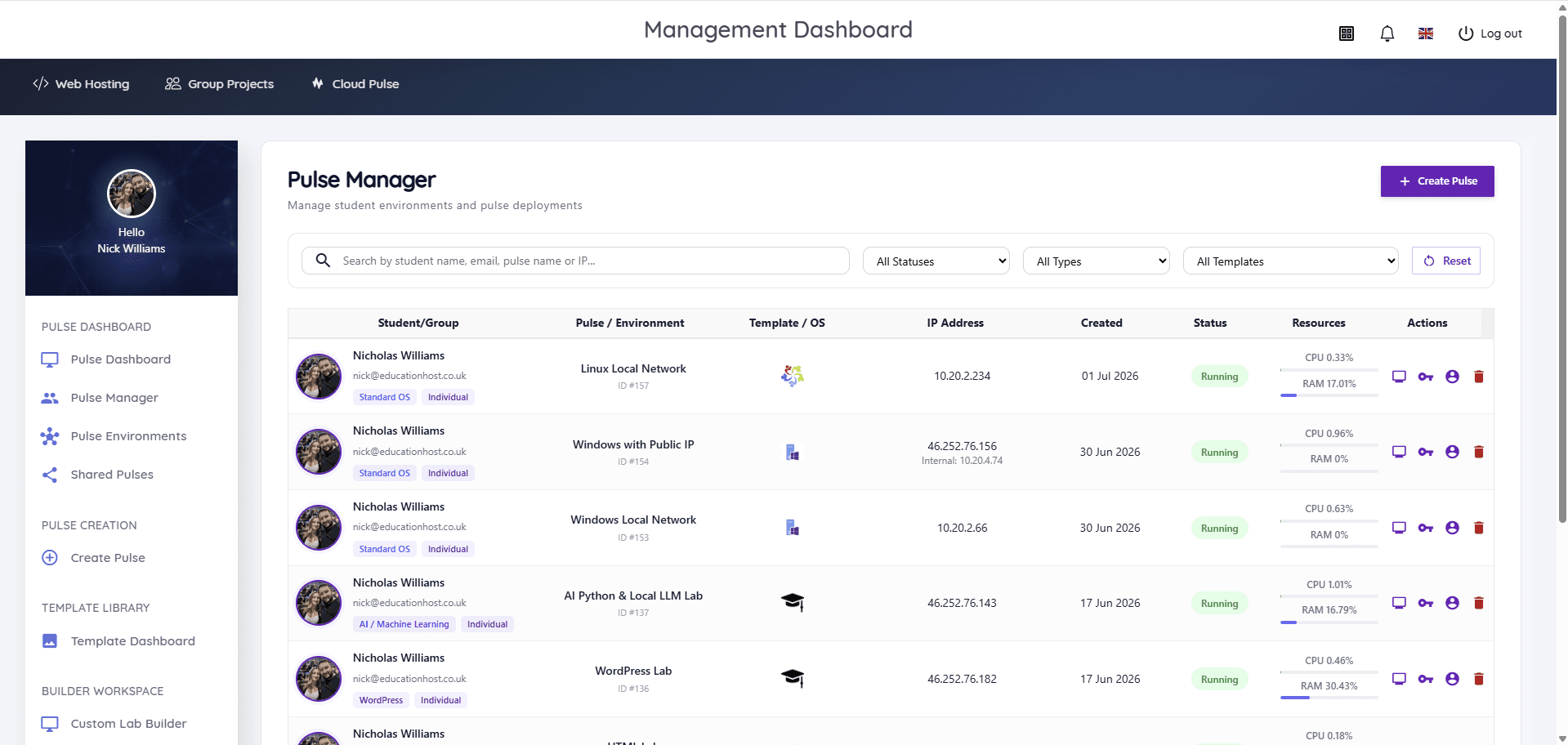
Cloud Pulse's model bakes in the structural controls this guide describes: sizing lives in lecturer-built templates rather than student choice, environments are deployed for the teaching block and removed afterwards rather than accumulating, and Pulse Manager gives staff live visibility of every environment and its resource usage — the observe layer, per module, without spreadsheet archaeology. Because deployments are scoped per institution, the operational specifics — schedules, limits, review cadence — are agreed during scoping against your teaching patterns rather than imposed as defaults.
We deliberately make no savings promises here: what a deployment costs depends on your module mix and how these controls are set, which is exactly what a pilot measures. The how pricing works page explains the deployment-scoped approach; bring your usage assumptions and we will help you test them.