
Solution
Student WordPress hosting without one giant multisite headache
Give students real WordPress and web hosting experience while keeping lecturers and technical teams in control of accounts, access, teaching groups and end-of-module cleanup.
- Support WordPress coursework and web development modules
- Manage students through teaching blocks and groups
- Give students real cPanel-based hosting experience
- Avoid putting every student project inside one huge WordPress network
A solution from Education Host — powered by Student Web Host Manager and managed education web hosting.
What is student WordPress hosting?
Student WordPress hosting gives learners access to hosting environments where they can build, manage and submit WordPress websites for teaching, coursework and practical projects. Instead of working in a simulated tool, students install and run WordPress on real hosting — with files, databases and cPanel where enabled.
For universities and colleges, the question is rarely whether to teach WordPress — it is how to host dozens or hundreds of student sites each term without creating an unmanageable estate. Education Host approaches this with Student Web Host Manager: separate, governed student hosting accounts organised around teaching, rather than one large shared WordPress network.
Large WordPress Multisite networks are not always ideal for student coursework
Many universities and colleges use WordPress Multisite successfully for central publishing, blogs, department sites and institutional web projects. But teaching has different operational needs: student websites are often temporary, cohorts change every year, coursework has deadlines, accounts need creating, suspending and cleaning up, and lecturers need visibility.
One shared network
Every student site sits inside the same WordPress installation, sharing its configuration and fate.
Plugin and theme risk
Plugins and themes are network-wide decisions — one problematic addition can affect every site.
Messy end-of-module cleanup
Old coursework sites accumulate inside the network, and removing them cleanly takes care and time.
Limited hosting skills
Students publish inside WordPress but may never touch files, databases, DNS or a real hosting control panel.
Limited lecturer visibility
Multisite admin screens are built for network administrators, not for lecturers tracking a teaching group.
One overloaded platform
A network built for institutional publishing gradually fills with unrelated, short-lived teaching projects.
Student Web Host Manager gives each learner a clearer hosting environment
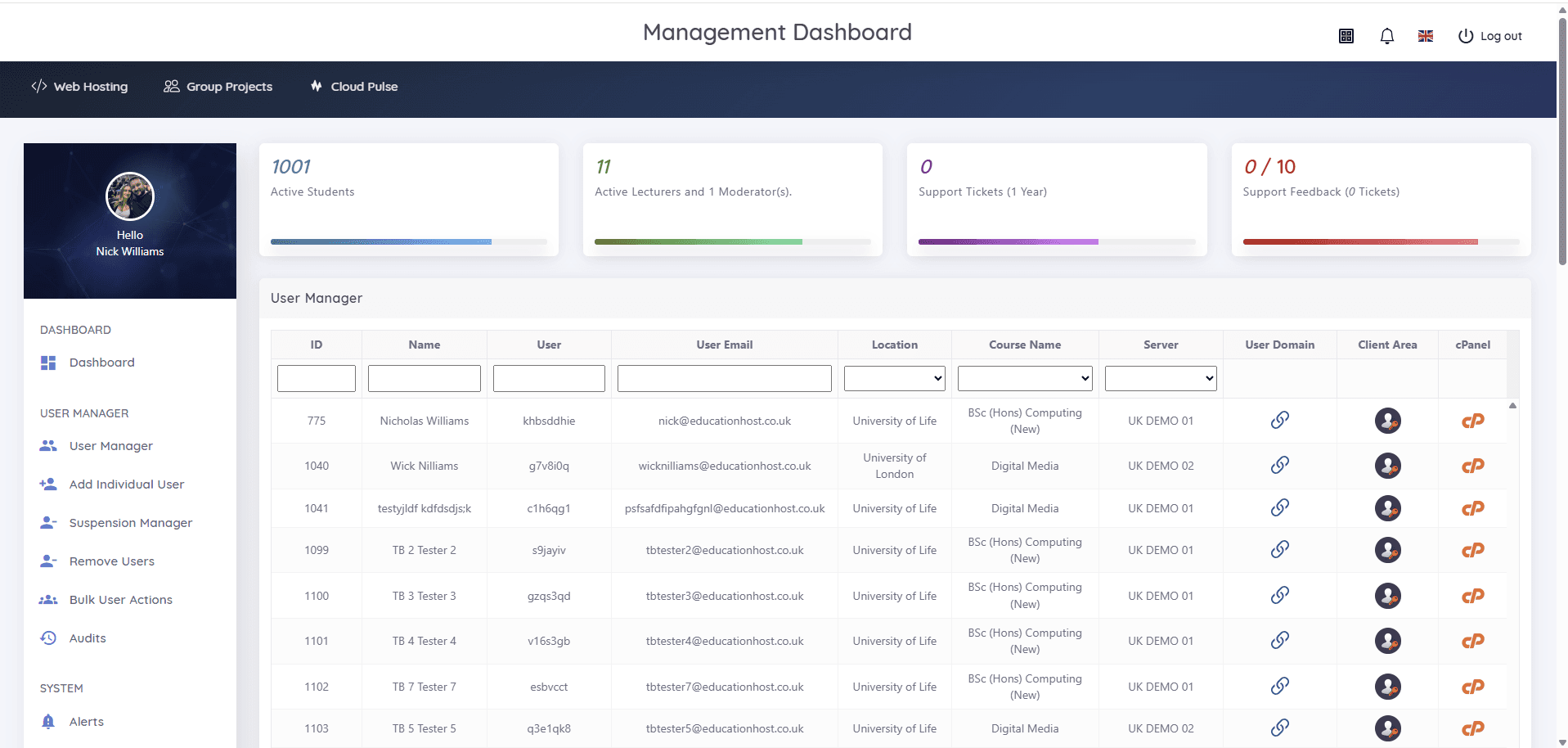
Student Web Host Manager helps Education Host deliver student website hosting around teaching workflows — teaching blocks, groups, account lifecycle and lecturer visibility — instead of forcing every project into a single WordPress Multisite model.
Teaching block organisation
Manage student hosting around modules, courses, cohorts and academic periods rather than one flat network.
Individual hosting accounts
Give students their own hosting space where appropriate, with cPanel access and realistic hosting workflows.
WordPress-ready environments
Support WordPress installation, coursework websites, PHP, MySQL and related web development tasks, where enabled.
Lecturer visibility
Help lecturers and support staff see student account status, access and activity more clearly.
Easier suspension and cleanup
Suspend, unsuspend or retire accounts when projects finish, modules end or students leave.
Better separation
Reduce the risk of every student project depending on one shared WordPress application.
WordPress Multisite and Student Web Host Manager solve different problems
Both can host many sites. The difference is what each is designed around — centralised WordPress publishing versus education hosting workflows.
Best for
WordPress Multisite
Centralised WordPress networks, blogs, department sites and controlled publishing.
Student Web Host Manager
Student websites, coursework hosting, teaching blocks and practical web development.
Student isolation
WordPress Multisite
Sites share the same WordPress application, plugins and themes.
Student Web Host Manager
Students can have separate hosting accounts and clearer boundaries.
Teaching workflows
WordPress Multisite
Not designed around modules, cohorts or lecturer workflows.
Student Web Host Manager
Built around teaching blocks, groups, account status and support visibility.
Hosting skills
WordPress Multisite
Students mainly learn WordPress publishing.
Student Web Host Manager
Students can learn WordPress plus cPanel, files, databases, DNS basics and hosting concepts.
Cleanup
WordPress Multisite
Old sites can accumulate inside the same network.
Student Web Host Manager
Accounts can be suspended, reviewed or retired around academic cycles.
Risk
WordPress Multisite
One large WordPress estate can become complex to secure and maintain.
Student Web Host Manager
Workloads can be separated more cleanly across hosting accounts and platforms.
WordPress Multisite still has a place
WordPress Multisite can be a good option for institution-managed publishing: staff blogs, research group sites, microsites, internal publishing networks and centrally controlled WordPress environments. Where central control over themes, plugins and users is the goal, it does that job well — and Education Host can host and support it.
For student coursework and teaching, Student Web Host Manager is often a better fit, because it is built around education hosting workflows — teaching blocks, account lifecycle and lecturer visibility — not just WordPress publishing.
Ideal for practical WordPress and web development teaching
Student WordPress hosting suits the hands-on modules universities, colleges and schools actually deliver.
WordPress coursework
Assessed WordPress sites students build, manage and submit.
Web development modules
HTML, CSS, PHP and CMS work on real hosting.
PHP and MySQL teaching
Database-backed coursework on the stack WordPress runs on.
Client website projects
Client-style briefs delivered as real, publishable sites.
Digital media courses
Portfolio and media sites for creative programmes.
First-year hosting skills
An early, guided introduction to files, databases and cPanel.
Group project websites
Shared sites for group assignments, alongside individual accounts.
Computing and creative departments
One managed hosting route across web-facing courses.
Student WordPress hosting — frequently asked questions
Answers to common questions about hosting student WordPress sites for teaching and coursework.
What is student WordPress hosting?
Student WordPress hosting gives learners access to hosting environments where they can build, manage and submit WordPress websites for teaching, coursework or practical projects.
Is WordPress Multisite the best option for student websites?
WordPress Multisite can work well for central publishing, but it is not always the best fit for temporary student projects, coursework, group work or teaching environments where account control, separation and cleanup matter.
How does Student Web Host Manager help with WordPress teaching?
Student Web Host Manager helps lecturers and support teams organise student hosting accounts around teaching blocks, groups, access, suspensions and account visibility.
Can students use real cPanel hosting for WordPress?
Yes. Education Host can provide student hosting environments where learners work with real hosting tools such as cPanel, files, databases and WordPress, where enabled by the institution.
Why use separate student hosting accounts instead of one WordPress Multisite?
Separate hosting accounts can provide clearer boundaries, more realistic hosting experience, easier cleanup and better operational control for teaching environments.
Make WordPress teaching easier to manage
Talk to Education Host about student WordPress hosting powered by Student Web Host Manager — scoped around your modules, cohorts and teaching calendar.