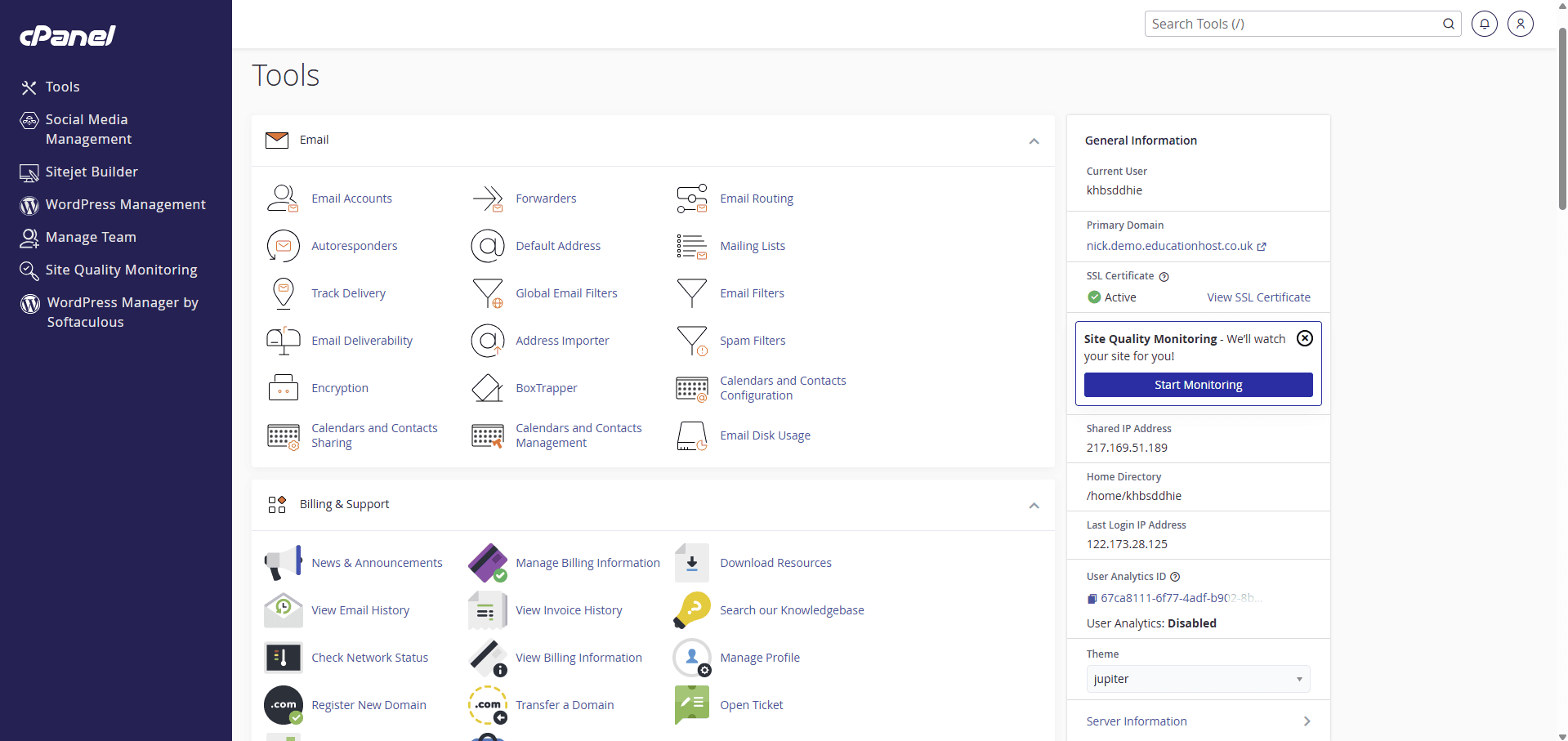
cPanel is the web hosting industry's most widely used control panel — the browser-based interface through which a hosting account's files, databases, subdomains and applications are managed — and universities teach on it because it is real industry tooling with per-account isolation and mature documentation. Students use cPanel to build and manage their sites; WHM (WebHost Manager) is the companion server-administration layer that creates and controls those accounts, and belongs with IT or the provider, never with students. What cPanel does not do is understand education: at cohort scale, universities add a management layer for enrolment, SSO, modules and lifecycle on top.
What is cPanel?
cPanel is a control panel for web hosting accounts: a web interface where the account holder manages everything their hosting includes — files, databases, subdomains, email tools, SSL and application installs — without command-line access to the server. It is commercial software (the product is cPanel & WHM) installed on the hosting server, and it has been the dominant panel across shared hosting for two decades, which is why 'log into cPanel' is practically a synonym for 'manage your hosting' across much of the industry.
For a university, that ubiquity is the point: teaching on cPanel means teaching the tool students are most likely to meet on commercial hosting after graduation, with the industry's documentation and tutorials all applying directly.
Why is cPanel used in teaching?
Three reasons recur. Authenticity: students learn on the real thing, not a simplified teaching sandbox, and the skills transfer to any cPanel host they meet professionally. Self-sufficiency: the panel makes the account legible — students can see their files, create their databases and diagnose their own sites, which converts support tickets into learning. Isolation: each cPanel account is a separate, quota'd, isolated unit, so a cohort maps naturally onto accounts that cannot interfere with each other.
There is also an honest fourth reason: operational familiarity. Hosting teams and providers know cPanel deeply, its behaviours are well understood, and the surrounding ecosystem (installers, backup tooling, documentation) is mature — all of which matters when the estate is hundreds or thousands of accounts.
What can students actually do in cPanel?
A student's cPanel account is a complete small hosting environment. Typically — features vary with how the institution configures accounts — that means:
- Files — upload, organise and edit site files through the File Manager or FTP-style tools
- Databases — create MySQL databases and users, and manage them through phpMyAdmin
- Applications — install WordPress and other applications through one-click installers, where the institution enables them
- Domains — manage their subdomain(s), and see how names map onto directories
- SSL — see the certificate securing their site (typically issued automatically on student subdomains)
- Email tools — accounts and forwarders at their domain, where relevant to the deployment
- Usage — quotas, statistics and logs that make resource limits and traffic visible
Pedagogically, the panel is a map of how hosting fits together: a student who can navigate cPanel has met files-to-URLs mapping, database credentials, DNS names and HTTPS in one coherent place.
What is WHM, and who should have access to it?
WHM (WebHost Manager) is cPanel's server-administration counterpart: the interface where accounts are created, packages and quotas defined, server services configured and the estate monitored. If cPanel is the tenant's dashboard, WHM is the building manager's office — it is how a hosting provider (or an institution running its own servers) operates the platform that cPanel accounts live on.
Access should be correspondingly narrow: platform administrators and the provider, full stop. Lecturers do not need WHM to teach, and giving academic staff server administration access to solve a visibility problem is the classic over-grant — the right fix is a management layer that gives lecturers scoped views of their own students (next section). Students never see WHM at all.
How can thousands of student accounts be managed?
This is where cPanel's design shows its origins: cPanel & WHM was built for commercial hosting providers managing customers, not universities managing cohorts. WHM will happily create three thousand accounts — what it does not know is which of them are second-year web development students, whose module ends on Friday, which lecturer may see which accounts, or that enrolment data changed overnight. At scale, those gaps become the actual work.
The answer is an education management layer above WHM: something that ingests enrolment data, provisions and names accounts by cohort, maps students to modules and lecturers, drives suspension and archival from the academic calendar, and exposes reporting — using WHM's machinery underneath rather than replacing it. Institutions build this themselves (scripts against the WHM interfaces, plus a spreadsheet or portal) or adopt a platform that provides it; the automation guide covers what the layer must do, whoever builds it.
Read next: How to automate student web-hosting accounts
What are cPanel's limitations for education?
Stated plainly, because choosing well requires them:
- No education concepts — courses, modules, cohorts, marking windows and lecturers do not exist in cPanel/WHM; that layer must come from elsewhere
- Per-account identity — cPanel logins are hosting credentials, not university SSO, unless an integration layer provides institutional sign-in
- A web-hosting shape — PHP/MySQL-centred hosting; full development stacks (Node.js toolchains, containers, root access) are a different delivery model
- Licensing cost — cPanel is commercial software, licensed per account or server, which belongs in the cost model
- Panel complexity — the full panel can overwhelm first-years; deployments benefit from curated configurations and a simpler front door
None of these argues against cPanel for web teaching — they define what must sit around it. Where the coursework itself outgrows hosting accounts (server administration, networking, custom stacks), the cloud-labs comparison guide covers the boundary.
Read next: Shared web hosting versus cloud labs for teaching
When would a different platform be more appropriate?
cPanel earns its place when the syllabus is website hosting on the industry-standard stack. Other choices win in identifiable cases: Plesk or DirectAdmin where an institution's operational experience or licensing economics point that way (capabilities overlap heavily — the panels guide compares them); custom portals where the institution wants a deliberately narrow student experience; command-line-only hosting where the module is explicitly about servers rather than sites; and managed application platforms where deployment workflow, not hosting management, is the learning outcome.
The decision is a teaching decision first: what should students learn to use? For most web, WordPress and digital-media portfolios the answer keeps landing on industry-standard panel hosting — which in practice means cPanel more often than not.
Read next: Choosing a web-hosting control panel for education
How does Student Web Host Manager relate to cPanel?
Student Web Host Manager is the education management layer this guide keeps pointing at — and it manages cPanel rather than replacing it. Students get real cPanel hosting (files, databases, WordPress tooling where enabled) reached through a dashboard that also carries their group projects, knowledgebase and support; sign-in is Microsoft Entra rather than separate hosting passwords; and the institution gets the parts cPanel never had — bulk provisioning from enrolment data, courses, modules and teaching blocks, delegated lecturer visibility, suspension and lifecycle automation, and estate-wide statistics. WHM-level server administration stays where it belongs, with the platform and Education Host's managed service.
If your evaluation has landed on 'cPanel hosting, but governed like an academic service', that combination is precisely what the platform page shows.