Student hosting works when it mirrors how teaching is organised: accounts belong to students, students belong to modules and cohorts, modules sit in teaching blocks and courses, and everything above — lecturer visibility, per-class packages, suspension dates, year-end rollover — hangs off that structure. Hosting managed as a flat list of accounts pushes all of it onto spreadsheets and memory, which is why the structure is worth building (or buying) before the first cohort, not after the first crisis. This guide covers the structures, the enrolment churn they must absorb, and a worked lifecycle from September to deletion.
Why organise hosting around academic structure at all?
Because every operational question about student hosting is secretly an academic-structure question. Who may see this account? (The lecturers of its modules.) What package should it have? (Its class's.) When is it suspended? (Its module's end date, plus marking.) When is it deleted? (Retention policy from its course's end.) A platform that knows the structure answers these by policy; one that does not answers them by ticket.
The structure also makes scale honest: three thousand accounts are unmanageable as a list and perfectly manageable as forty modules across a dozen courses — which is the granularity at which staff actually think and act.
What structures does hosting need to model?
The set is smaller than a student-records system and must stay that way — hosting needs enough structure to govern accounts, not a shadow registry:
- Courses (programmes) — the long-lived container; useful for retention policy and reporting
- Modules — the working unit: enrolment, lecturer access, packages and lifecycle dates all attach here
- Teaching blocks — modules grouped by academic period (term, semester), so calendar operations run in bulk
- Cohorts and classes — the human grouping lecturers teach and see
- Locations and campuses — where multi-site and distance provision needs its own visibility
- Academic years — the axis everything rolls over on
The discipline is one-way flow: enrolment truth originates in institutional systems and flows into the hosting structure via imports or syncs — hosting reflects the registry, never competes with it.
Read next: How to automate student web-hosting accounts
How should enrolment churn be handled?
Mid-term enrolment change is the norm, not the exception, so each case needs a policy the structure executes:
- Late enrolments — the commonest case: account created through the standard pipeline on joining, package and module attached automatically; a late joiner should be publishing the same week
- Withdrawals — access suspended promptly, content retained through the retention window (withdrawn students have appeal and return rights too)
- Module switches — membership moves; the account persists with its new class's visibility and package
- Repeat students and resits — the account (or an archived copy) reopens for the resit window; reopening is a routine operation, not a favour
- Suspended students (interruption of studies) — access suspended, content held, timeline paused rather than run down
- Extensions — the individual exception: one student's suspension date moves without moving the class's
The test of the structure is that each of these is one recorded operation with an audit trail — not an email thread and a manual edit.
How does delegation to lecturers work?
Scoped by the structure: a lecturer sees and supports the students of their modules — account status, site links, the ability to raise or perform the routine operations teaching needs — and nothing beyond them. That converts the visibility lecturers currently obtain by ticket ('can you check whether my students have accounts?') into self-service, while infrastructure and policy stay with IT.
Multiple lecturers per module, moderators and teaching assistants all fit the same model as roles attached to the module rather than the platform: the structure, not a permissions spreadsheet, decides who sees what. When staff change mid-year — they do — the fix is a membership change, made once.
How should packages and naming vary by class?
Packages attach to classes: the web-development module's accounts carry its quota and feature set, the WordPress module's carry another, and the policy for multi-module students (commonly one account per student with the most generous applicable package) is written once. Per-class packages keep provision fair inside a class — the unit where students compare — while letting a video-heavy media module differ from a text-heavy coding one without negotiation.
Naming should stay student-stable rather than module-stable: one account and subdomain per student (derived from stable identity), with modules as memberships around it, avoids the mess of per-module accounts multiplying URLs and fragmenting a student's work. Reporting then reads along the structure: accounts, activity and storage by module, block and course — the shape in which anyone actually asks.
How should the academic-year rollover work?
As a designed annual operation with a checklist, run in the quiet weeks: close the year (suspend ended modules' access, per policy), advance retention (last year's suspended accounts move a stage — archived, or deleted if their clock has run out), prepare structures (next year's modules and blocks created, staff attached, packages reviewed), then intake (the new cohort's accounts through the standard pipeline). Continuing students keep their account across the rollover; what changes is memberships.
The rollover is also the annual data-quality moment: accounts with no live enrolment, students with duplicate accounts, never-logged-in accounts from last September — the discrepancies a year accumulates get reconciled once, deliberately, rather than discovered during an audit.
Read next: What happens to student websites after a course ends?
A worked lifecycle example
An illustrative year — generic, not any real institution's policy — for a second-year web-development module in the autumn teaching block:
- September, week -2: module and cohort exist in the hosting structure; the class list syncs; accounts for new students are provisioned, continuing students gain the module membership; the lecturer checks their roster view
- September, week 1: students sign in with university credentials; two late enrolments arrive through the standard pipeline mid-week
- October: one student switches seminar groups (membership change), one withdraws (access suspended, content held)
- December: teaching ends; the module's accounts move to restricted at the submission deadline — sites stay up, changes stop, per the assessment policy
- January: marking completes; accounts suspend at the block's end date; one extension keeps one account restricted a fortnight longer
- February: appeals window closes; the module's memberships archive; students retain access to their accounts through their other live modules
- June: one resit student's access reopens for the resit window, then re-suspends
- The following autumn: rollover advances retention; content whose clock has expired is deleted with the notice the policy requires
Every step above is a bulk or per-student operation against the structure — which is the whole argument: none of it required a spreadsheet, and all of it left an audit trail.
How does Student Web Host Manager model academic structure?
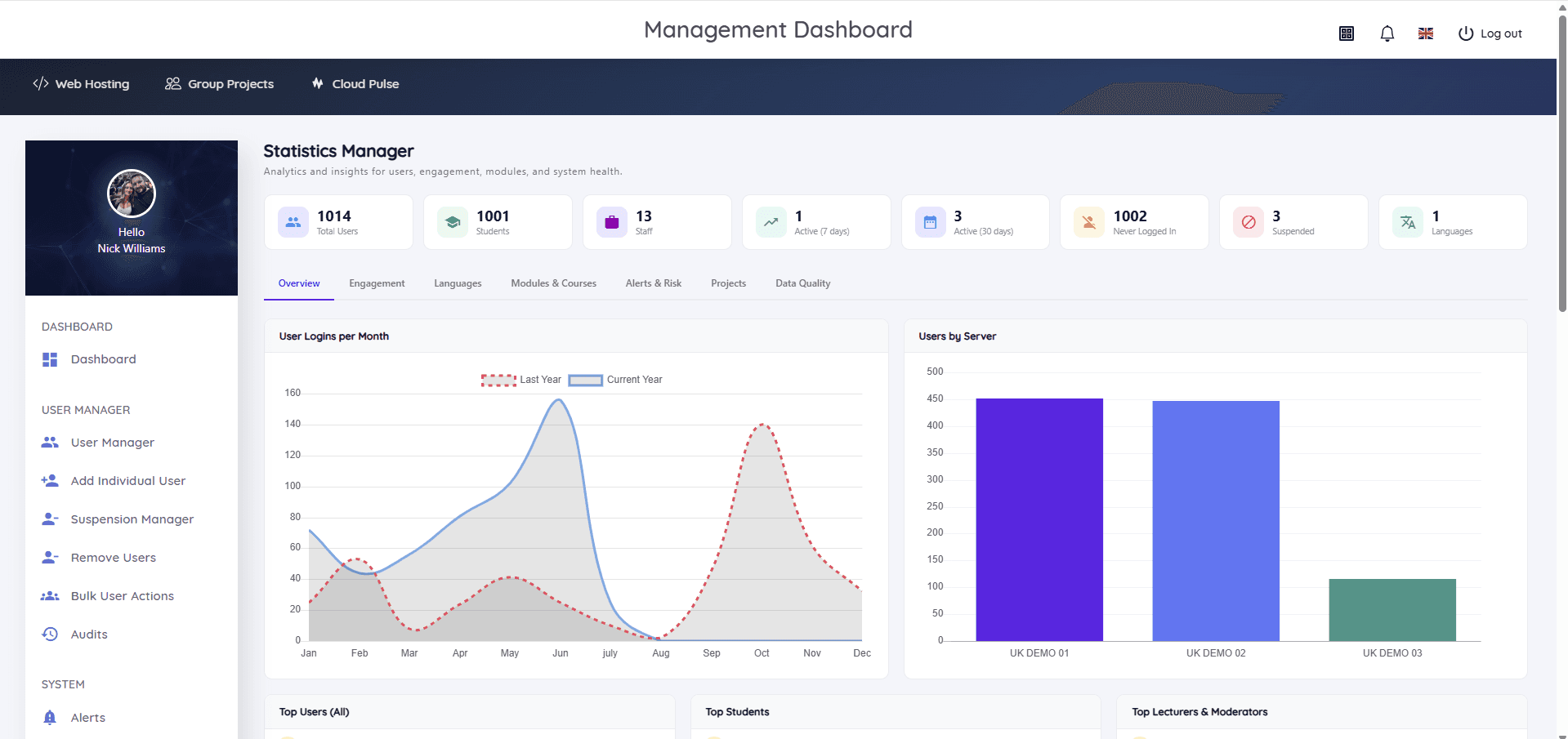
This guide describes Student Web Host Manager's native shape: the platform models locations and campuses, courses, modules, teaching blocks and cohorts, with students imported or synced into them and hosting access following the structure. Lecturers and administrators get delegated, role-based management of their own students; the suspension manager and lifecycle states (active, restricted, archived, reopened) execute the calendar operations in bulk; and the Statistics Manager and User Map give the estate-level views — engagement, suspended accounts, never-logged-in students, access across campuses and countries — that flat account lists cannot.
For institutions running their own estate, the structures in this guide are buildable; the platform's case is that they arrive as product rather than project.